Next.js vs WordPress for South African Small Businesses
Two ways to build a website, explained without the jargon: what each one costs over time, who ends up maintaining it, and which fits a small South African business.
Next.js vs WordPress for South African Small Businesses
If you have asked a few web designers for a quote, you have probably heard "Next.js vs WordPress" come up without much explanation of what it actually means for you. Both are ways to build a website. They are not better or worse in every situation, they are built for different kinds of ongoing work, and that difference is what should decide which one you pick.
Here is what each one actually is, what it costs once the site is live, and which fits a small business in South Africa.
What WordPress actually is
WordPress is software that runs on a server and gives you a dashboard to write pages, posts, and manage images without touching code. You pick a theme for how it looks, then add plugins for anything extra: contact forms, SEO tools, galleries, bookings, payments. It is widely used around the world, and plenty of businesses run perfectly well on it.
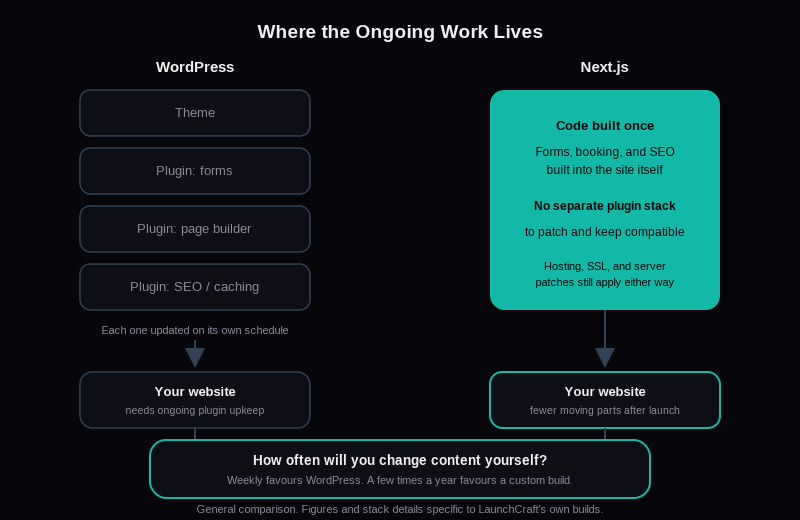
The part that matters for ongoing cost: WordPress itself, your theme, and every plugin you install are separate pieces of software, each updated on its own schedule. Keeping all of them current, and compatible with each other, is ongoing work. Skip it for too long and the most common way a WordPress site gets broken into is through an outdated plugin, not WordPress itself.
What Next.js actually is
Next.js is a framework developers use to build a website as code, directly, rather than assembling one from a theme and a stack of plugins. There is no separate plugin ecosystem to patch, because the features you need (a contact form, a booking widget, a blog) are built into the site itself rather than bolted on afterwards.
This is what LaunchCraft builds on. Our web development page lists our stack: React, Next.js, TypeScript, and Tailwind CSS. In practice that means fewer moving parts after launch, because there is no plugin stack sitting between your site and the internet that needs separate attention.
Speed: why it matters more than it sounds
A slow site costs you customers before they even see what you offer. Google also factors loading speed into how it ranks pages, so this is not just a comfort issue.
WordPress sites can be made fast, but speed usually fights against the plugin stack: every plugin adds code that has to load, and heavy page-builder plugins in particular are a common cause of slow WordPress sites. A site built directly in code has less of that overhead by default. LaunchCraft's web development service targets 90+ Google PageSpeed scores as a baseline, which is realistic precisely because there is no plugin weight to work around.
Security and maintenance: who is actually responsible
This is the part most quotes skip over.
With WordPress, keeping the core software, the theme, and every plugin updated is an ongoing job. Someone has to do it: you, your developer, or a maintenance plan you pay for. Miss it for a few months and you are running known, published vulnerabilities.
With a custom build, there is no plugin list to audit, but the hosting, SSL certificate, and underlying server software still need to stay current. LaunchCraft's hosting covers that: SSD servers, free SSL, and a 99.9% uptime guarantee, with security patches applied as part of the R199 a month hosting fee. The difference is the size of the job, not whether there is one at all.
Cost over time: the number that actually matters
The once-off build fee is the number everyone compares. It is the wrong one to compare alone.
| Cost over time | WordPress | Next.js (LaunchCraft) |
|---|---|---|
| Once-off build | Varies: free themes or paid themes plus setup time | R2,999 to R14,850 depending on package (Starter, Essentials, Growth) |
| Ongoing software | Theme and plugin licence renewals, which vary by plugin | None, no plugin licences |
| Hosting | Varies by host and plan | R199/month: hosting, SSL, backups, security patches |
| Who patches it | You, or a maintenance retainer | Included in the monthly fee |
LaunchCraft's three packages are Starter at R2,999 (one page, live in 2-3 days), Essentials at R9,850 (1-5 pages, live in 7-10 days), and Growth at R14,850 (6-12 pages with forms, booking, and advanced SEO, live in 10-14 days). All three run on the same R199 a month hosting, which starts 30 days after launch and can be cancelled anytime with 30 days notice. Full detail is on the pricing page.
A WordPress site's once-off cost can start lower if you use a free theme and do the setup yourself, but premium themes, paid plugins, and the time spent on updates tend to close that gap within a year or two, especially once something breaks and needs a developer's time to fix anyway.
A worked example
A Strand retailer wants a five-page site: home, products, about, a store locator, and a contact form with WhatsApp integration.
On WordPress, that is a premium theme, a page-builder plugin, a forms plugin, and probably a caching plugin to keep speed reasonable, each with its own renewal and update schedule.
On LaunchCraft's Essentials package, that is R9,850 once-off, live in 7-10 days, then R199 a month covering hosting and security. No plugin list to maintain. The trade-off: if the retailer wants to add a new page type themselves next year, that is a request to their developer rather than a dashboard they edit alone.
When WordPress still makes sense
If your business publishes new content often (a blog multiple times a week, frequently changing product listings) and someone on your team is willing to learn the dashboard, WordPress's editing experience is a real advantage. It was built for exactly that kind of frequent, hands-on editing.
When a custom build makes more sense
If your site mostly needs to look good, load fast, and get occasional updates (a few times a year, or whenever your prices or services change), a custom build removes the maintenance overhead you would otherwise be paying someone to manage. Most small business sites, a handful of service pages and a contact form, fall into this category.
Questions worth asking whoever builds your site
- Who updates the plugins or theme, and how often? If the answer is "you should", budget time or a maintenance retainer for it.
- What happens to speed as the site grows? Ask to see a PageSpeed score for a comparable live site, not just a promise.
- What is the full monthly cost, including hosting, security, and any plugin renewals? Compare that total, not just the once-off build fee.
Where to start
- Work out how often you expect to change content yourself, honestly, not optimistically.
- Ask any provider for the full cost over three years, not just the build fee.
- Check what a comparable live site actually loads like on your phone, on mobile data, not office WiFi.
If you want to see what a fast, low-maintenance build looks like for your business, our web development page has the detail, or message us on WhatsApp and we will talk through what fits your situation.
Ready to implement these strategies?
Put these strategies to work for your business. Our Cape Town team handles the implementation.